组合模式(Composite Pattern)是一种结构型设计模式,它允许将对象组合成树形结构,并用统一的方式处理单个对象和对象组合。这种模式让客户端可以忽略单个对象和组合对象的差异,从而对它们进行一致操作。
简单来说,组合模式就像 “文件系统”—— 文件和文件夹可以被统一对待,文件夹中可以包含文件或其他文件夹,形成树形结构,用户可以对任意节点(文件或文件夹)执行复制、删除等操作。
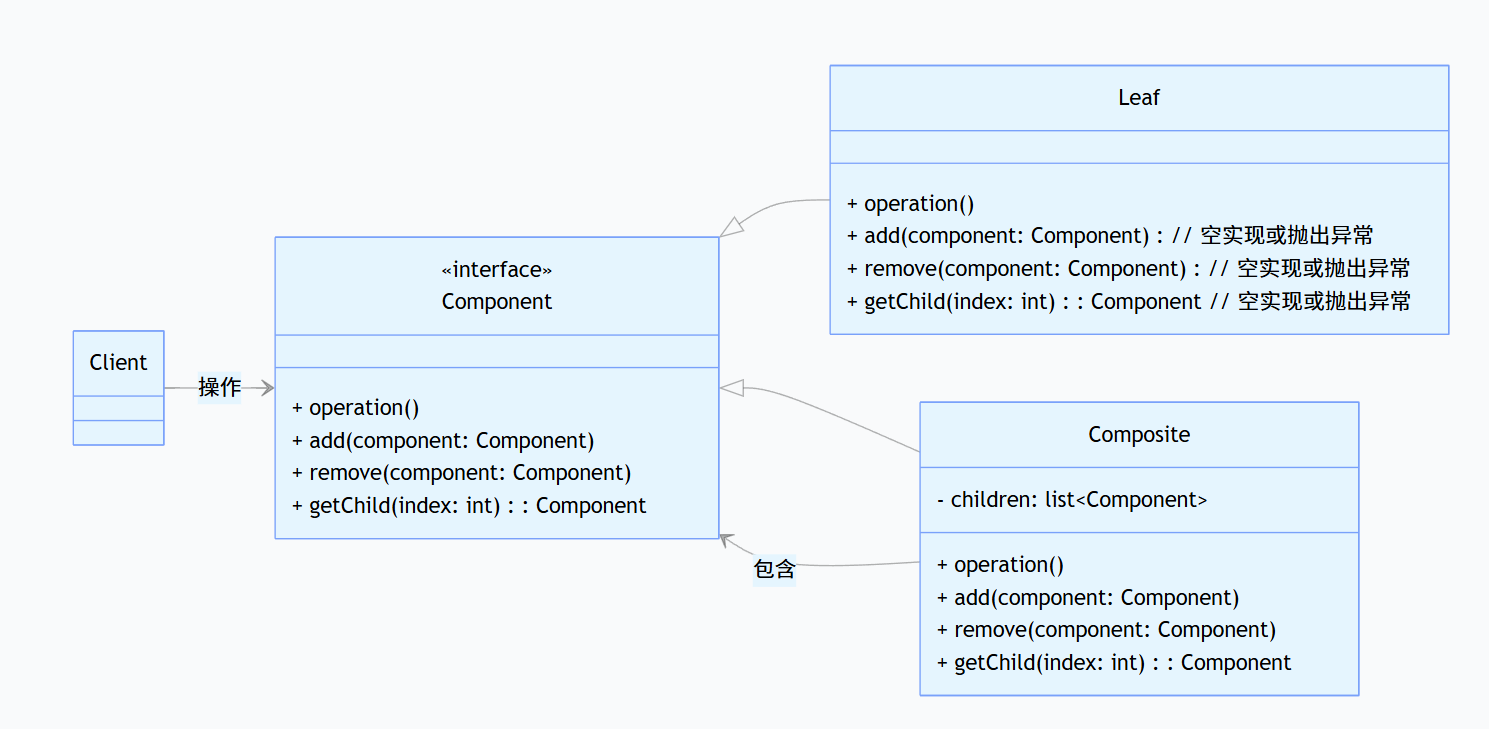
在上图中:
- 抽象组件(Component):定义了叶子节点和组合节点的共同方法,包括业务方法(
operation())和管理子节点的方法(add()、remove()、getChild())。
- 叶子节点(Leaf):没有子节点,实现
operation()方法,但通常不实现子节点管理方法(或抛出异常)。
- 组合节点(Composite):包含子节点集合,实现
operation()方法(通常会递归调用子节点的operation()),并实现子节点管理方法。
- 客户端(Client):通过抽象组件接口与对象交互,无需判断操作的是叶子还是组合,实现对整个树形结构的统一处理。
下面以 “公司组织结构管理” 为例,通过代码示例说明组合模式的工作原理。在企业中,组织结构呈现树形结构(总部包含部门,部门包含子部门或员工),组合模式可以统一处理 “部门”(组合节点)和 “员工”(叶子节点)。
我们首先定义一个抽线的表示公司内部门或者员工的对象,这个对象有展示自己display的方法,增加子对象和移除子对象的add和remove方法。
1
2
3
4
5
6
7
8
9
10
11
|
interface OrganizationComponent {
void display(int depth);
void add(OrganizationComponent component);
void remove(OrganizationComponent component);
}
|
然后实现一个叶子节点对象,它可以具体代表一个公司中的员工
1
2
3
4
5
6
7
8
9
10
11
12
13
14
15
16
17
18
19
20
21
22
23
24
25
26
27
28
29
30
|
class Employee implements OrganizationComponent {
private String name;
private String position;
public Employee(String name, String position) {
this.name = name;
this.position = position;
}
@Override
public void display(int depth) {
String indent = "-".repeat(depth);
System.out.println(indent + "员工:" + name + "(" + position + ")");
}
@Override
public void add(OrganizationComponent component) {
throw new UnsupportedOperationException("员工不能添加子组件");
}
@Override
public void remove(OrganizationComponent component) {
throw new UnsupportedOperationException("员工没有子组件可移除");
}
}
|
然后再定义一个部门对象,它可以是一个公司的部门也可以是部门下的一个小组
1
2
3
4
5
6
7
8
9
10
11
12
13
14
15
16
17
18
19
20
21
22
23
24
25
26
27
28
29
30
31
32
33
34
|
class Department implements OrganizationComponent {
private String name;
private List<OrganizationComponent> children = new ArrayList<>();
public Department(String name) {
this.name = name;
}
@Override
public void display(int depth) {
String indent = "-".repeat(depth);
System.out.println(indent + "部门:" + name);
for (OrganizationComponent child : children) {
child.display(depth + 2);
}
}
@Override
public void add(OrganizationComponent component) {
children.add(component);
}
@Override
public void remove(OrganizationComponent component) {
children.remove(component);
}
}
|
现在我们在客户端中,就可以通过这个组合模式的方式构建出整个公司的架构:
1
2
3
4
5
6
7
8
9
10
11
12
13
14
15
16
17
18
19
20
21
22
23
24
25
26
27
28
29
|
public class CompanyStructure {
public static void main(String[] args) {
OrganizationComponent headquarters = new Department("总公司");
OrganizationComponent techDept = new Department("技术部");
techDept.add(new Employee("张三", "高级工程师"));
techDept.add(new Employee("李四", "产品经理"));
OrganizationComponent frontendTeam = new Department("前端团队");
frontendTeam.add(new Employee("王五", "前端开发"));
techDept.add(frontendTeam);
OrganizationComponent marketDept = new Department("市场部");
marketDept.add(new Employee("赵六", "市场专员"));
headquarters.add(techDept);
headquarters.add(marketDept);
System.out.println("公司组织结构:");
headquarters.display(1);
}
}
|
从上面的例子中我们可以看出,应用了组合模式后有诸多优势:
- 统一处理:客户端用相同代码处理单个对象(员工)和组合对象(部门),简化代码逻辑。
- 树形结构灵活扩展:可以随时新增部门或员工,或调整层级关系(如将前端团队从技术部移到产品部),无需修改客户端代码。
- 递归操作便捷:通过组合节点的递归调用,轻松实现对整个树形结构的遍历(如统计总人数、部门数量等)。