备忘录模式(Memento Pattern)是一种行为型设计模式,它的核心作用是在不破坏对象封装性的前提下,捕获并存储对象的内部状态,以便后续需要时能将对象恢复到之前的状态。
简单来说,备忘录模式就像 “游戏存档”—— 游戏过程中可以随时存档(存储当前状态),遇到失败时可以读档(恢复到之前的状态),且存档过程不会暴露游戏内部的复杂数据结构。
备忘录模式的UML如下
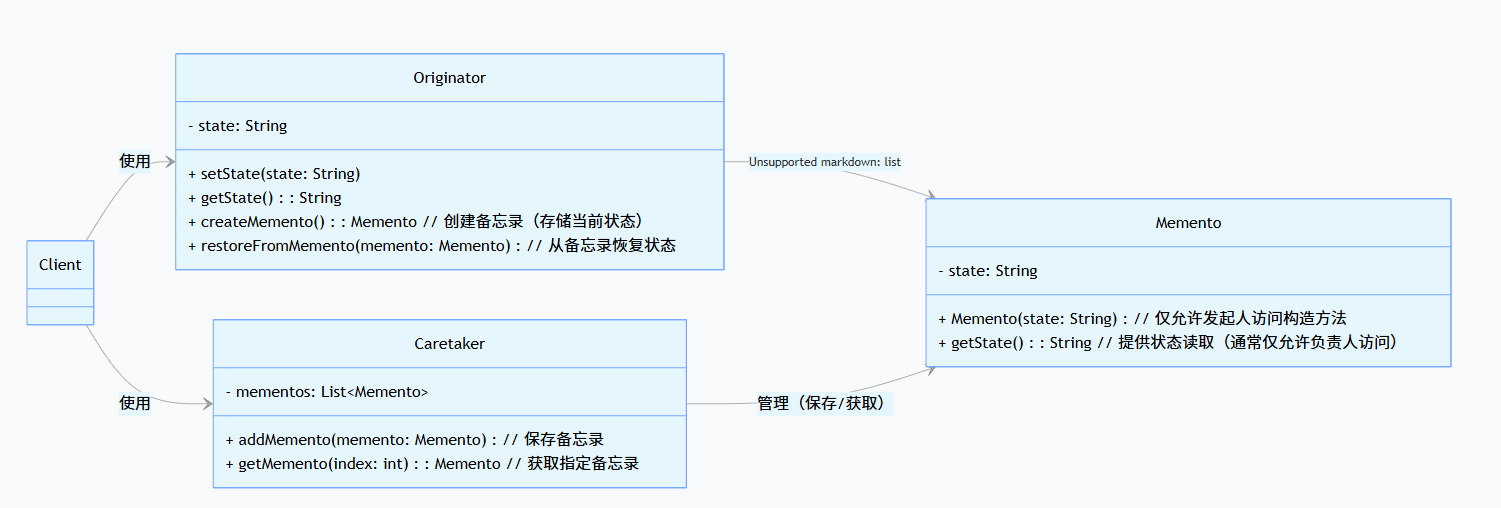
如上图,备忘录模式包含三个核心角色,职责严格分离:
- 发起人(Originator)
- 核心对象,拥有内部状态(如游戏角色的血量、装备)。
- 提供
createMemento()方法:创建备忘录,将当前内部状态存入备忘录。
- 提供
restoreFromMemento()方法:从备忘录中读取状态,恢复自身到之前的状态。
- 关键:备忘录的创建和恢复逻辑由发起人控制,确保状态封装性。
- 备忘录(Memento)
- 仅负责存储发起人状态,不包含任何业务逻辑。
- 状态变量通常为私有,仅通过有限接口(如
getState())暴露,且仅允许发起人或负责人访问(通过访问权限控制,如 Java 中的包访问权限)。
- 关键:防止外部对象随意修改或查看状态,保护发起人封装性。
- 负责人(Caretaker)
- 充当备忘录的 “仓库”,负责存储和管理多个备忘录(如按时间顺序存储多个存档)。
- 不关心备忘录的内容,也不参与状态的创建或恢复,仅提供 “保存” 和 “获取” 的管理能力。
- 关键:隔离发起人(状态创建者)和备忘录(状态存储),降低耦合。
这个模式的核心价值在于:
- 保护封装性:发起人状态仅通过备忘录间接暴露,外部无法直接访问或修改。
- 状态回溯:支持对象状态的多次存档和恢复(如多步撤销操作)。
- 职责分离:将 “状态创建”(Originator)、“状态存储”(Memento)、“状态管理”(Caretaker)拆分,符合单一职责原则。
备忘录模式的常见应用场景包括:
- 文本编辑器的撤销 / 重做功能(存储每次编辑后的文档状态)。
- 游戏存档 / 读档(存储角色、地图、进度等状态)。
- 事务回滚(数据库存储事务执行前的状态,失败时恢复)。
- 配置中心的版本管理(存储配置的历史版本,支持回滚)。
下面以 “文本编辑器的撤销功能” 为例,用代码实现备忘录模式。这个场景中,我们需要保存文本的历史状态,以便用户随时撤销到之前的编辑状态。
首先我们创建这个文本编辑器的备忘录对象,它用于存储文本编辑器的内容
1
2
3
4
5
6
7
8
9
10
11
12
13
14
15
16
17
18
19
20
21
22
|
class TextMemento {
private final String content;
private final int cursorPosition;
TextMemento(String content, int cursorPosition) {
this.content = content;
this.cursorPosition = cursorPosition;
}
String getContent() {
return content;
}
int getCursorPosition() {
return cursorPosition;
}
}
|
接着我们创建一个文本编辑器对象,它记录每次的键盘录入和光标位置并存到备忘录对象中,并且提供了从某个备忘录恢复的方法。
1
2
3
4
5
6
7
8
9
10
11
12
13
14
15
16
17
18
19
20
21
22
23
24
25
26
27
28
29
30
31
32
33
|
class TextEditor {
private String content = "";
private int cursorPosition = 0;
public void type(String text) {
content = content.substring(0, cursorPosition) + text + content.substring(cursorPosition);
cursorPosition += text.length();
System.out.println("编辑后:" + content + "(光标在" + cursorPosition + "位置)");
}
public void moveCursor(int position) {
if (position >= 0 && position <= content.length()) {
cursorPosition = position;
System.out.println("光标移动到:" + cursorPosition);
}
}
public TextMemento createMemento() {
System.out.println("创建存档...");
return new TextMemento(content, cursorPosition);
}
public void restoreFromMemento(TextMemento memento) {
this.content = memento.getContent();
this.cursorPosition = memento.getCursorPosition();
System.out.println("撤销后:" + content + "(光标在" + cursorPosition + "位置)");
}
}
|
第三步,我们创建一个管理备忘录的对象,它将每次的备忘录副本保存到一个列表对象中,并提供从列表中取出某个备忘录副本的功能。
1
2
3
4
5
6
7
8
9
10
11
12
13
14
15
16
17
18
|
class Caretaker {
private final List<TextMemento> history = new ArrayList<>();
public void saveMemento(TextMemento memento) {
history.add(memento);
}
public TextMemento getPreviousMemento() {
if (history.size() == 0) {
return null;
}
return history.remove(history.size() - 1);
}
}
|
最后我们演示客户端使用备忘录模式的代码
1
2
3
4
5
6
7
8
9
10
11
12
13
14
15
16
17
18
19
20
21
22
23
24
25
26
27
28
29
30
31
32
33
34
35
36
37
|
public class TextEditorClient {
public static void main(String[] args) {
TextEditor editor = new TextEditor();
Caretaker caretaker = new Caretaker();
caretaker.saveMemento(editor.createMemento());
editor.type("Hello ");
caretaker.saveMemento(editor.createMemento());
editor.type("World");
editor.moveCursor(5);
caretaker.saveMemento(editor.createMemento());
editor.type("Java ");
System.out.println("\n执行第一次撤销:");
TextMemento prev1 = caretaker.getPreviousMemento();
if (prev1 != null) {
editor.restoreFromMemento(prev1);
}
System.out.println("\n执行第二次撤销:");
TextMemento prev2 = caretaker.getPreviousMemento();
if (prev2 != null) {
editor.restoreFromMemento(prev2);
}
}
}
|